Quick instructions
11. AI-tutor AI assistant
11.1. AI-tutor for students
What is the AI-tutor tool?
AI-tutor is an AI assistant, an AI chat, that can be added to a Moodle course. The teacher provides AItutor with knowledge from all or some of the course materials. AI-tutor answers questions on the basis of these materials. Students can ask AI-tutor questions related to the course instructions, completion requirements or content.
Unlike, for example Copilot, AI-tutor operates within a specific Moodle course area answers questions only on the basis of the materials available there and according to predefined instructions.
The AI-tutor tool will be piloted at Tampere Universities from 5.10.2026 - 31.5.2027. AI-tutor is available only on selected Moodle course areas. Teachers on each course area will provide more detailed guidance on AI-tutor and how to use it.
Getting started

If AI-tutor is available on your course area, start a conversation by clicking the AI-tutor icon displayed at the bottom of the course area.
Use AI-tutor like any other chat application. Enter a text prompt and the AI will respond to it.
Do not provide AI-tutor with secret or highly confidential information, such as a real person's health data or any information about minors.
Chat window functions
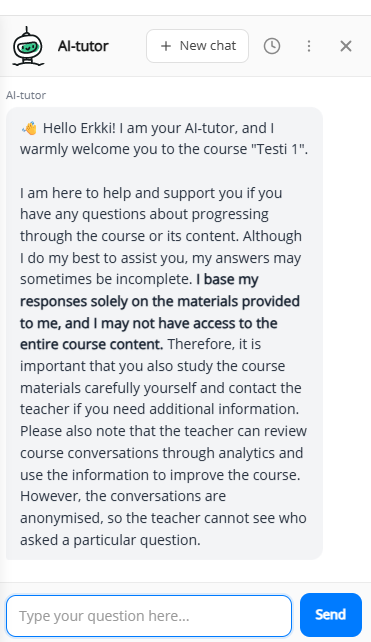
Click "New chat" if you are switching to a completely different topic. Otherwise, AI-tutor may confuse your previous discussion with the new topic.
You can find your previous conversations by clicking the "clock" icon.
You can change the size and position of the chat window from the "three dots" icon.
Privacy, information security and language models
Teachers on the course area can review conversations with AI-tutor, but they cannot see students’ names in those conversations.
Students and teachers cannot delete conversations with AI-tutor. All conversations are permanently deleted when the course area is removed, typically 6-24 months after the end of the course.
The information provided to AI-tutor and conversations with AI-tutor are not used to train AI models. All data and data processing remain within the EU in Tampere Universities’ own Microsoft Azure environment.
YES, you may use AI-tutor to process:
- Public, internal and confidential information (data classification categories 5, 4 and 3). For example, basic personal data such as a name and student number is allowed.
NO, you may not use AI-tutor to process:
- Confidential information with additional restrictions or secret information (data classification categories 2 and 1). For example, information about minors or a real person’s health data is prohibited.
You can find a more detailed privacy notice in the AI-tutor chat window: click the three dots icon and select “Privacy”.
During the pilot, AI-tutor uses ChatGPT-5.6 Luna or Terra as its language model, depending on the use case.