Quick instructions
3. Login
3.1. Multi-factor authentication
This guide applies only to logging in with a special Moodle account.
If you log in using a TUNI account or an account from another university via HAKA authentication, multi-factor authentication already takes place before accessing Moodle and Moodle does not request any further verification.
To improve Moodle’s security, multi-factor authentication (MFA) was introduced for special Moodle accounts on 18 May 2026. Multi-factor authentication adds an extra verification step to the login process and provides stronger protection for your Moodle user account, for example against phishing attacks.
After 18 May 2026, logging in to TUNI Moodle requires, in addition to your username and password, at least one verification method.
Available verification methods
The following verification methods are available in TUNI Moodle:
✅ Email verification (default)
You will receive a verification code by email when logging in.
✅ Authenticator app
For example Google Authenticator, Microsoft Authenticator, or a similar app that generates a one-time verification code.
✅ Security key
A physical device (e.g. a USB security key) used to verify your login.
This is a particularly secure option.
What do you need to do?
If you want to use email verification only, you do not need to do anything in advance. After multi-factor authentication has been enabled, when you log in to TUNI Moodle, Moodle will prompt you to enter a numeric code that is automatically sent to your email after you have entered your username and password.
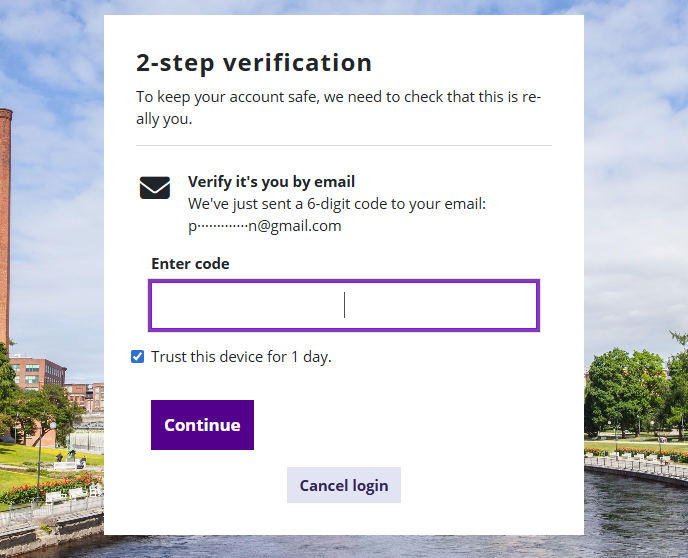
If you want to use other verification methods, or if emails sent by Moodle do not reliably reach your inbox, you can configure an additional verification method in your Moodle user settings:
- Open the user menu by clicking your profile picture in the top-right corner
- Select Preferences from the menu
- Choose Multi-factor authentication preferences from the list of links
- Configure an Authenticator app and/or a Security key.
You can configure only one authenticator app in Moodle. You can configure multiple security keys. You can manage and change your verification methods in the same place.
Why is this important?
Multi-factor authentication:
- protects your user account even if your password is compromised
- improves the overall security of Moodle
- is a common and recommended practice in higher education institutions and organizations
Problems signing in?
I did not receive an email from Moodle. What should I do?
Check your email spam folder and, in Outlook, also the Other view of the Inbox or the Junk Email folder. Also try the email client’s search function.
Email details:
Subject: Here's your verification code
Sender: Do not reply to this email (via TUNI Moodle) <noreply-tuni@mmg.fi>
If you cannot find the email, try signing in to Moodle again after half an hour. The code is valid for 30 minutes, and only after that will Moodle send a new code to your email address.
My email address is no longer valid. How can I change my email address in TUNI Moodle?
Contact IT Helpdesk. Changing the email address also requires confirmation from the person who ordered your Moodle account.
If you need help setting up a verification method or encounter problems, please contact the IT Helpdesk: it-helpdesk@tuni.fi